Integrating Microsoft Dynamics 365 Business Central with KRA eTIMS
Oct 01, 2026 By IpsumTek Consult Ltd
Business Central and KRA eTIMS: A Practical Guide
It is 4:30 pm on the last day of the month. Your accountant is trying to file the VAT return. The sales report in Business Central says one thing, but the eTIMS portal says another. A key customer has just rejected an invoice because the QR code is missing. Meanwhile, an input VAT claim was disallowed last week because a supplier’s invoice never made it to the KRA system. Now, your team is scrambling to fix everything before the deadline.
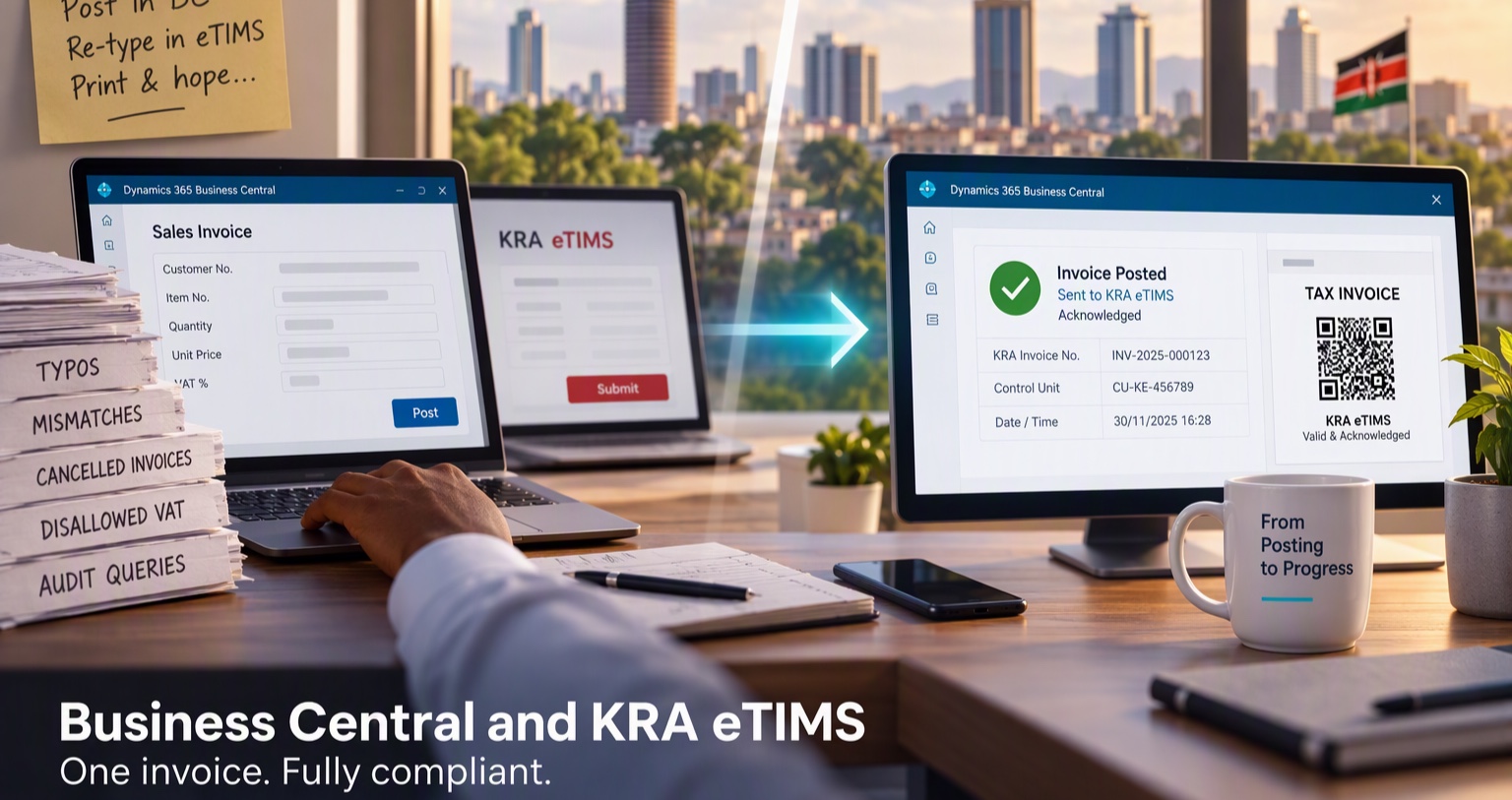
We see this exact scenario frequently in our work with Kenyan businesses. Many companies start with good intentions. They invest in Microsoft Dynamics 365 Business Central to run their finances properly. At the same time, they keep a separate eTIMS device or portal to stay compliant with KRA. For a while, the manual workaround seems fine. Someone posts an invoice in Business Central, then re-types the same details into the eTIMS portal. Then they print both.
But let us be honest. How many invoices did your team have to cancel and re-issue last quarter because of a simple typo or a mismatch? That workaround breaks down very quickly as your business grows.
Why Manual Re-keying Stops Working
eTIMS is not just about printing a piece of paper with a QR code on it. The Kenya Revenue Authority requires you to transmit every invoice and credit note in a specific digital format. You must use the right item codes, tax rates, and buyer details. Most importantly, you must receive an acknowledgement before that invoice is legally valid.
When you rely on manual re-keying, you create two conflicting sources of truth. The invoice number in Business Central might not match the one KRA sees. The VAT amount can be slightly different due to rounding. A customer’s KRA PIN might be missing or mistyped in the portal.
When your volume grows from 20 invoices a day to 200, your team simply cannot keep up. That is when the phone calls start. An input VAT claim is disallowed. A routine audit flags that your documents lack valid control unit details. This is not a people problem. Your team is not lazy. It is a systems problem.
How a Proper Integration Actually Works
Think of a proper integration like this: instead of maintaining two separate ledgers, you finally have one.
When your user posts a sales invoice or a sales credit memo in Business Central, the system immediately and silently sends that document to KRA through the eTIMS service in the background. Your user does not open a new browser tab. They do not log into a separate portal. They just post the invoice, exactly as they always have.
KRA validates the details in real time and sends a response back. A well-built integration captures that response. It writes the KRA-assigned invoice number, the control unit details, and the QR code payload straight back onto the posted document in Business Central. When you print or email that invoice, the correct eTIMS QR code is already there.
But what happens if the internet drops, or KRA’s servers are temporarily down? This is where good engineering matters. A proper integration does not just fail silently. It logs the error, alerts the user, and places the invoice in a retry queue. Your finance manager gets a simple list: sent, acknowledged, failed. No guessing.
Behind the scenes, making this work requires careful mapping. Our consultants map your item master to KRA item classifications. We align your VAT posting groups with KRA’s specific tax codes. We also ensure customer details, especially KRA PINs, are complete and verified before the invoice is posted. That data mapping is the foundation of the project. For your team, the way they work does not change, except that the tedious double entry disappears.
What This Means for Finance, Audit, and the Owner
A unified system delivers clear, measurable benefits across your organization.
For the finance manager, it is about closing cleanly. You post once. The invoice is compliant. Your VAT return in Business Central perfectly matches what KRA has on file, because every posted invoice has a KRA acknowledgement attached to it. You spend less time fixing errors and more time analyzing the business.
For auditors and tax advisors, it is about trust and traceability. We configure the system so you can trace any posted invoice in Business Central directly to its KRA acknowledgement. You can see the exact time it was sent, the response received, and the QR code generated. If KRA asks for proof that a specific invoice was transmitted, you can pull it up in two clicks.
For the business owner, it is about risk management. Penalties for non-compliant invoicing and disallowed VAT are expensive and disruptive. [VERIFY: current KRA penalty framework for eTIMS non-compliance, e.g., under the amended Tax Procedures Act]. Pamoja, we help you reduce that risk not by adding more manual checks, but by removing the manual step where human error happens.
Practical Lessons from Real Implementations
We have deployed this integration for trading, manufacturing, and service businesses across Nairobi and beyond. A few hard-earned lessons keep repeating.
First, clean your master data before you integrate. If your items have different units of measure in Business Central and KRA, or your customers are missing PINs, the integration will fail. We usually spend the first few days of a project just cleaning up items, customers, and tax codes. It is not glamorous work, but it is the foundation of a smooth go-live.
Second, test credit notes, not just standard invoices. Many teams test a simple sales invoice, see the QR code, and declare victory. Then, the first time they need to post a return or a price correction, it fails because credit notes have different validation rules in eTIMS. Test the full lifecycle.
Third, decide your offline policy early. Do you want to block invoice printing until KRA acknowledges the transmission? Or do you want to allow printing with a "Pending KRA" stamp, with the system retrying automatically in the background? A retail business with long customer queues will make a different choice than a B2B distributor. We help you make this policy decision upfront.
Fourth, train the person posting, not just the IT department. This integration is for the finance and sales admin team. If they do not understand what a failed transmission message means, or what to do when KRA returns an "invalid PIN" error, they will find a workaround. A one-hour, practical training session with the actual users who post invoices is worth more than a 50-page technical manual.
Looking Beyond eTIMS
You can apply this same "single source of truth" thinking to other KRA touchpoints later. For example, automating withholding tax certificates or pulling iTax return status directly into Business Central for visibility. The principle remains the same: post once in Business Central, let the integration handle compliance in the background, and keep the audit trail in one secure place.
Where Do You Stand?
So, here is a question to sit with. If KRA asked for your last 50 invoices tomorrow, with proof that each one was acknowledged and the QR code printed, how confident would you be?
If the answer is "not very confident," that is a very good place to start.
At IpsumTek Consult Ltd, we help businesses review their current Business Central setup for eTIMS readiness, clean up the master data, and implement the integration properly. No extra devices cluttering the desk. No more double typing.
If you would like us to look at your setup, talk to our consultants at consult@ipsumtek.dev. We can start with a short, no-obligation readiness review of your Business Central environment and your current eTIMS process.